

Evals: Change Your Document Workflows Without Fear
Every anyformat workflow now has a Health tab: build a dataset with known-correct answers, score any workflow version against it, and see exactly what got better and what broke, before production finds out.
Parsing a document is a demo. Keeping an extraction workflow correct in production, month after month, while everything around it changes, is engineering.
Here is the situation every team hits. Your invoice workflow is live. Then a new supplier shows up with a layout nobody planned for. Product asks for two more fields. You rewrite an instruction to fix one stubborn document. Each change is a bet: did accuracy go up, or did you just break a case that used to work? If you can't answer that, the rational move is to never touch a workflow that mostly works. That's how document pipelines rot.
Most document AI products stop at "look what we extracted". We think the hard part starts after that, so we built Evals: a full evaluation surface inside every workflow that turns changes from bets into measurements. It works like tests work for code: fix the inputs, pin the expected outputs, score every version against them, compare.
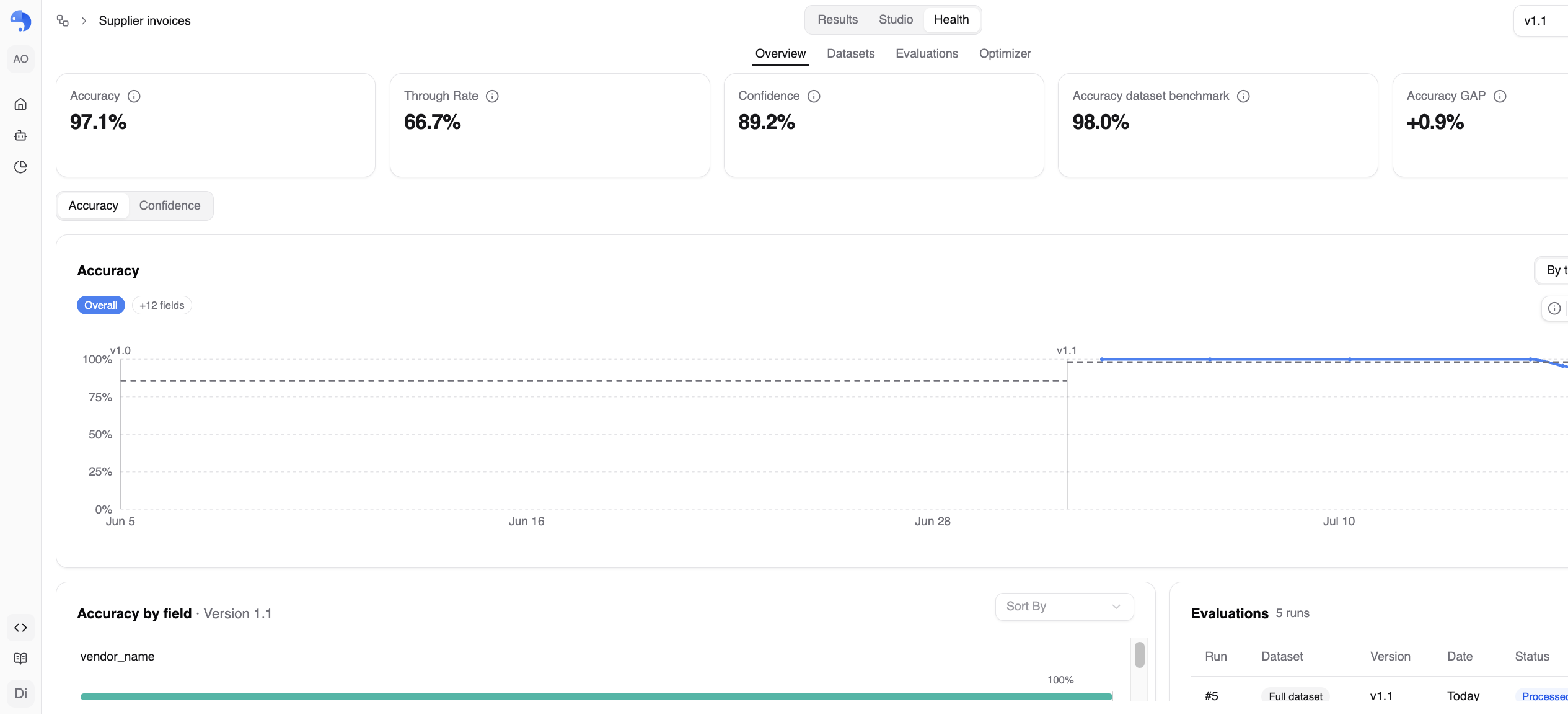
It lives in the new Health tab of every Extract and Classify workflow, next to Results and Studio. Three subtabs: Overview, Datasets, Evaluations. (Sharp eyes will spot a fourth one in the screenshots. More on that at the end.)
Start from documents you already trust
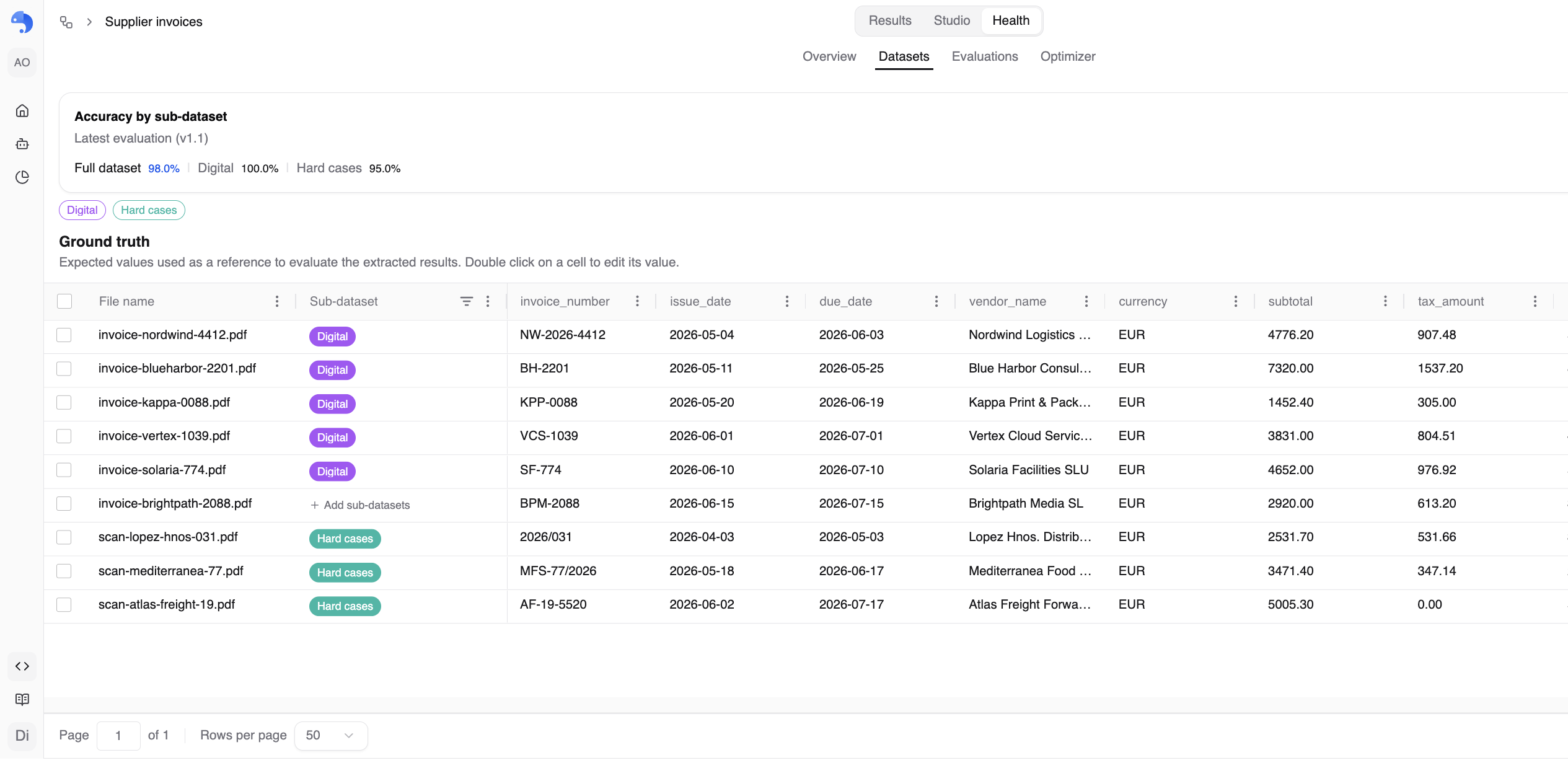
An evaluation is only as honest as its reference data, so the dataset comes first. Every workflow has one, and you fill it in whichever way matches where your labelled data lives:
- Promote from production. Take a document the workflow already processed, verify every datapoint in the review UI, and hit Add to dataset. The values you just confirmed become that file's ground truth: the expected answers future runs are scored against.
- Upload labelled data. Already have a labelled set? Drop the documents together with a
.jsonfile named after each one (invoice.pdfpairs withinvoice.json) and the expected values are imported directly. A review step flags duplicates, invalid JSON and orphan ground-truth files before anything is uploaded. Ground truth is optional at this point: you can add documents alone and fill in the answers later, straight in the dataset grid.
Two properties matter here. First, the dataset is fully decoupled from production: adding a file duplicates it, so nothing you do in Evals ever touches production data, and production runs never move your benchmark underneath you. Second, ground truth is editable in place: a spreadsheet-style grid, one column per field, double-click to correct a value, nested tables for lists and objects. Reference data you can't maintain goes stale; this one is built to be maintained.
One accuracy number is never the whole story
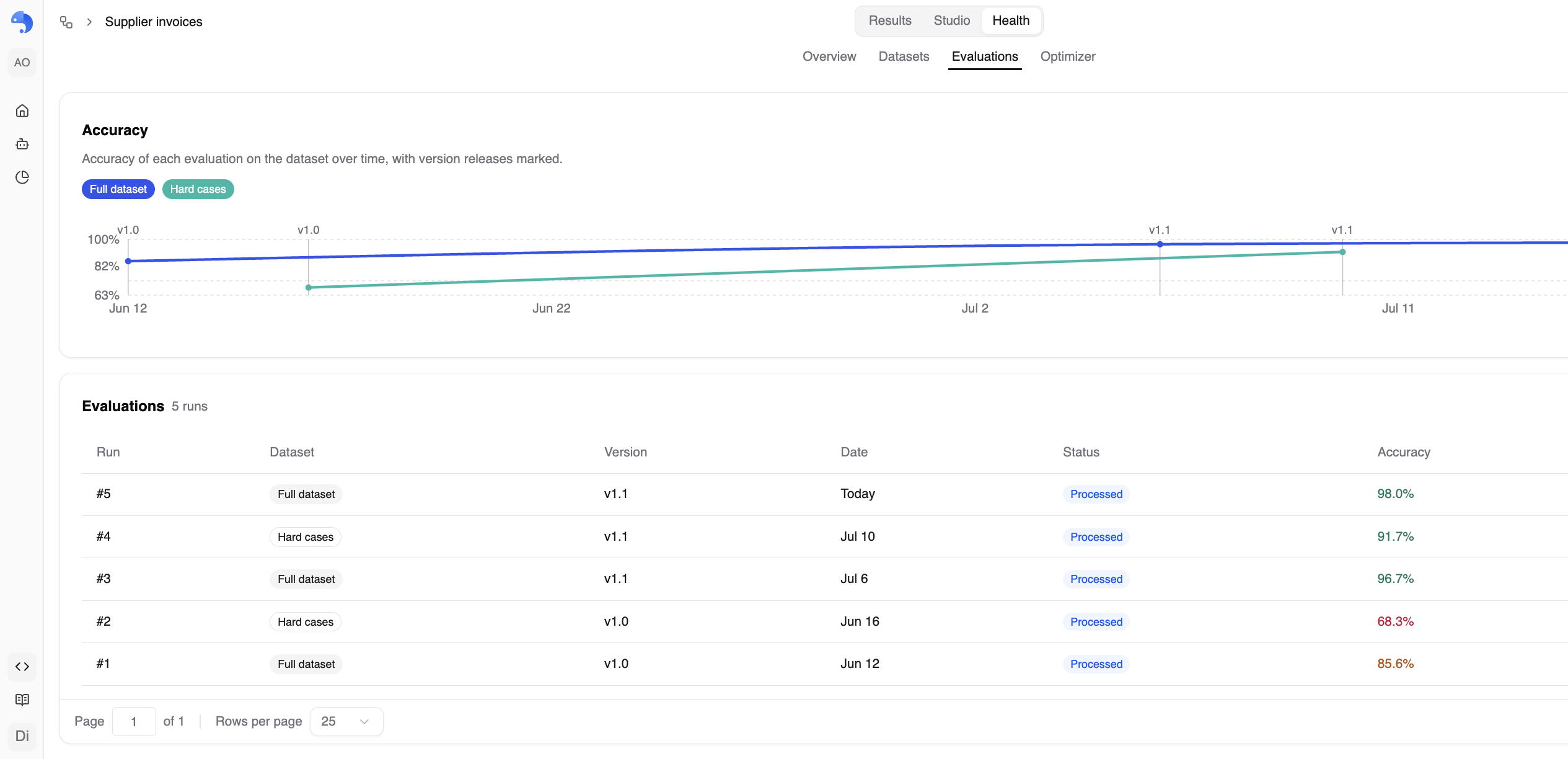
A single overall number hides exactly the thing you need to know: where the workflow struggles. So datasets support sub-datasets: tag files by whatever distinction matters (provider, document type, a "hard cases" tag for the scans that break everything) and read accuracy per slice as well as overall.
This is the difference between "the workflow is at 98%" and "98% overall, but 95% on the scanned hard cases, and it was 68% there two versions ago". The first number feels good. The second one tells you what to fix, and lets you scope your next evaluation to just that slice while you iterate on it.

Evaluations: numbered, pinned, immutable
When you want a measurement, you run an evaluation: pick a scope (the full dataset or a single sub-dataset) and a workflow version, and anyformat re-extracts every in-scope document and scores each field against its ground truth.
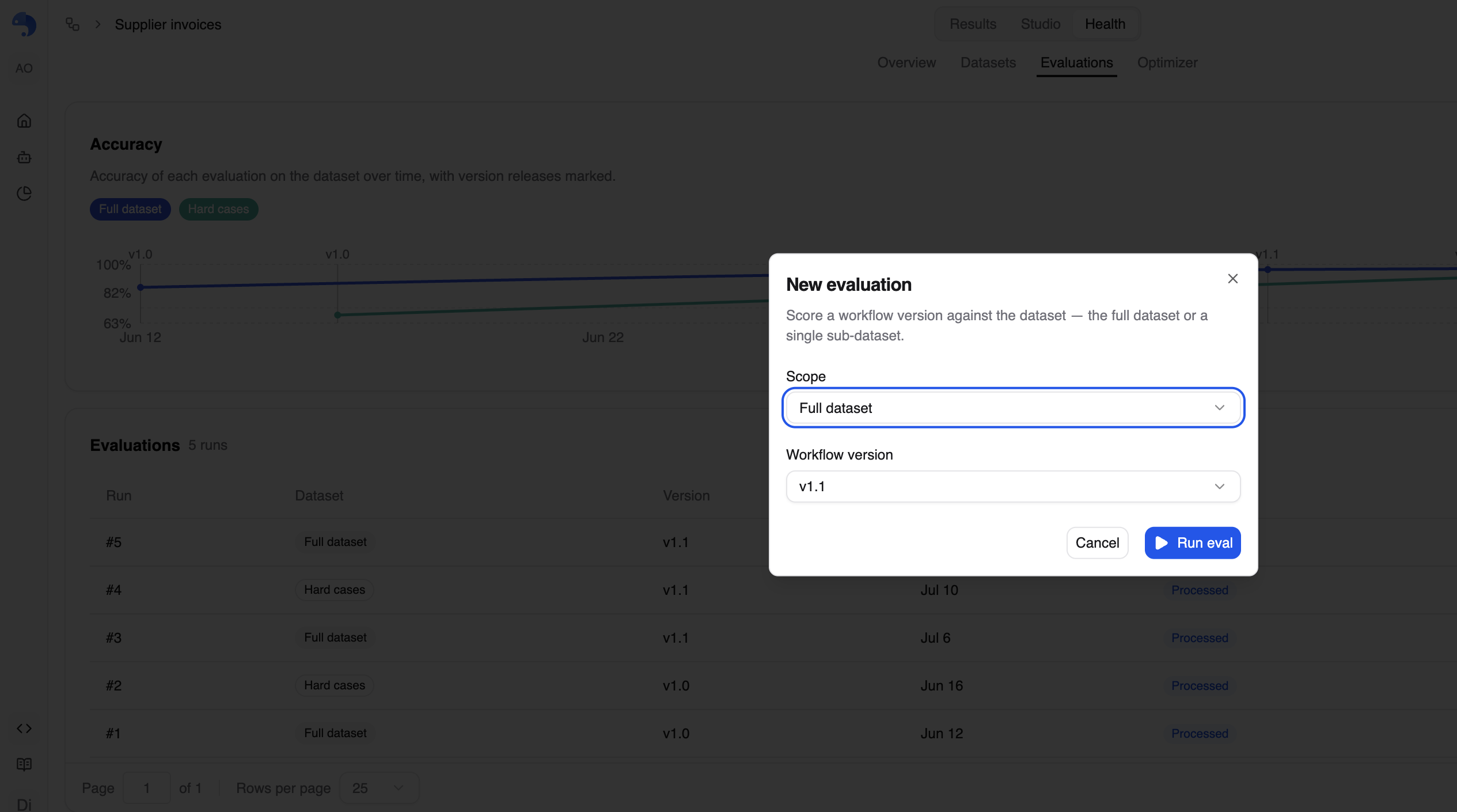
Every run lands in a numbered history: #1, #2, #3, each pinned to its version, scope, date and accuracy. And each run is immutable. Editing ground truth or refining the workflow never rewrites a past evaluation; you run a new one to measure the effect. That rule is what makes the difference between two runs real signal instead of noise, and it's what makes the run list read like CI history for your workflow: baseline, change, re-run, compare.
One honest note: an evaluation runs real extractions, one per in-scope document, and consumes credits accordingly. That's another reason sub-dataset scoping exists: iterate cheaply on the slice you're fixing, run the full dataset when you're ready to sign off.
Debug the number, not just read it
An accuracy percentage tells you whether to worry. The evaluation detail page tells you what about. Open any run and you get the headline numbers (accuracy with a delta versus the previous run, documents passed, fields graded) and two breakdowns:
- By file: which documents drag the number down, and which fields failed on each.
- By field: which fields miss consistently across documents. A field that fails everywhere is an instruction problem; a field that fails on one slice is a document problem.
From a failing file you drill straight into a side-by-side of result versus expected, showing only the values that differ. No exporting JSON, no eyeballing two blobs in a diff tool. You see exactly what the workflow said and exactly what it should have said, then you go fix the field definition, save a new version, and run the next eval.
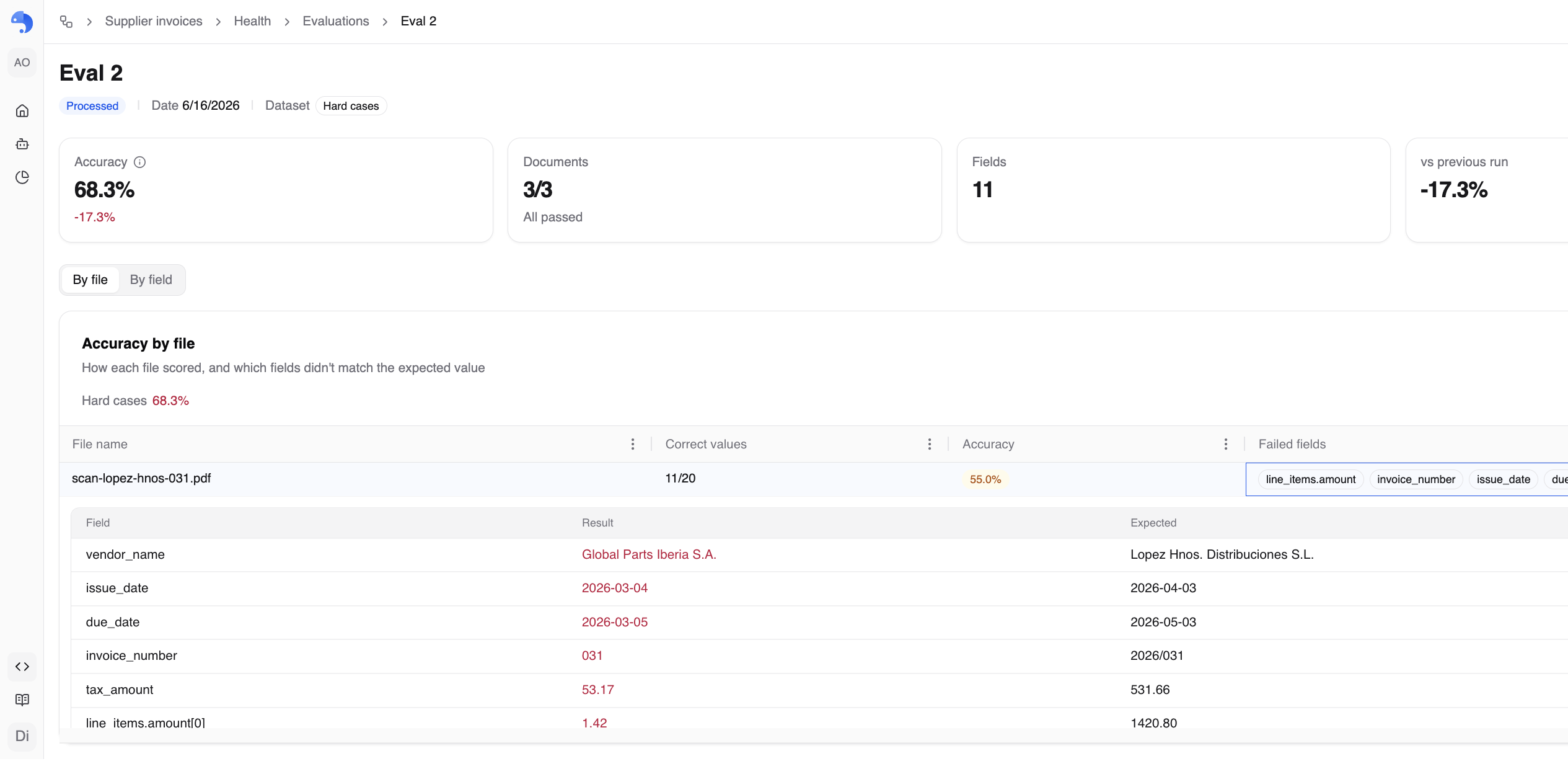
That's a real debugging session in one screen: the scanned invoice read the bill-to company as the vendor, parsed day-first dates the American way, and truncated the invoice number. Each of those became a sharper field instruction in the next version.
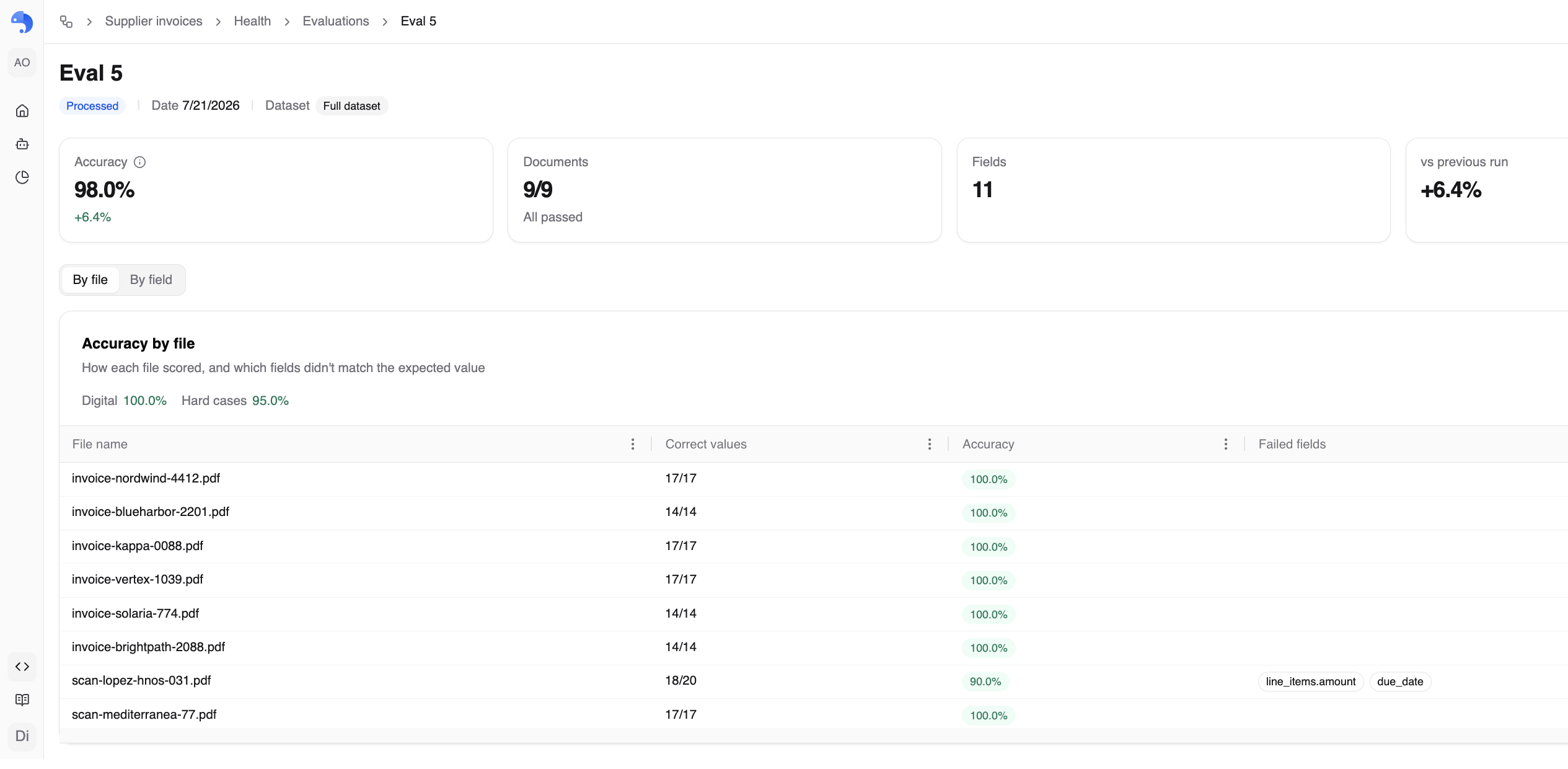
Then watch production against your benchmark
Evals would be half a feature if the numbers stayed in a lab. The Health Overview puts your dataset benchmark next to live production metrics for the same version: production accuracy (from human verification), confidence, through rate (the share of fully-reviewed extractions accepted without a single edit), and the accuracy gap: benchmark minus production.

Those numbers do different jobs. Confidence tells you where to look first. Production accuracy tells you how often the workflow is actually right on live traffic. The benchmark tells you what the version is capable of on documents you've verified end to end. When production and benchmark diverge, that's not a mystery anymore, it's a signal: your live documents have drifted from your dataset, and it's probably time to promote a few recent ones and re-evaluate.
Control is the feature
Document extraction vendors love the before/after demo: messy PDF in, clean JSON out. Fine, we love it too. But a demo is a single point in time, and your workflow is not: it will change twenty times in its first year, because your documents will, your schema will, and the models underneath will.
Evals is what makes that evolution safe. A fixed dataset that production can't move. Ground truth you can maintain. Scoring that's reproducible. History that's immutable. Slices that anchor accuracy to the documents that are actually hard, not to a flattering average. That's what it takes to run document processing in production without fear, and it ships with every workflow, in the Health tab, today.
Build a dataset, run eval #1, and make your next workflow change knowing exactly what it did.
And the dataset you build here is about to start working harder for you: Optimizer is coming soon. It will let a workflow optimize itself against its own dataset, using your evals as the target. More on that shortly.
Docs: Datasets & evaluations · Building a dataset · Running evaluations